- Wikily maps L on an inventory, equipment or storage item to lock/unlock. Locking excludes an item from the shop’s bulk Sell action, but a confirmed individual sale can still proceed.
- Official patch 0.1.9 introduced Buyback for the last eight items sold to an NPC. The reference describes one shared shop list, with recovery at the original sale price.
- Dragging an item outside the item windows destroys the entire stack in the reviewed reference. Destruction and salvage are not documented as Buyback transactions.
Identify whether you sold, salvaged or destroyed the item
The recovery decision starts with the action you actually performed. Selling sends an item to an NPC transaction and may leave it in Buyback. Salvaging breaks equipment into materials. Dragging it outside the item windows is destruction in the reviewed item-actions reference. Those paths can all remove an item from your inventory, but only the sale has a documented buyback list. A missing object is not enough to choose a recovery method. Stop the cleanup and check your last action before generating more transactions.
Evidence: Inventory, Storage and Carriage · Salvage · Deskrawl: Idle ARPG - [Patch 0.1.9] - Resizable/Draggable Window, Cloud Save, Buybacks and More - Steam News
| Action | Reported effect | First recovery check |
|---|---|---|
| Individual NPC sale | Whole stack sold at per-item sale value | Open Buyback immediately |
| Bulk shop Sell | Eligible unlocked equipment/consumables sold | Inspect the eight-sale retention limit |
| Salvage | Equipment converted into materials | No salvage-undo path is documented here |
| Drag outside item windows | Whole stack destroyed | No destruction-buyback path is documented here |
Evidence: Inventory, Storage and Carriage · Salvage
Official 0.1.9 explicitly promised recovery of the last eight NPC sales, using an accidentally sold Dark Horse as its example. That is first-party evidence for the feature and its retention count. The detailed right-click controls, shared list and confirmation behavior below come from Wikily, an unofficial reference. They are useful source-reported operating instructions, rather than a current-client test we performed.
Evidence: Deskrawl: Idle ARPG - [Patch 0.1.9] - Resizable/Draggable Window, Cloud Save, Buybacks and More - Steam News · Inventory, Storage and Carriage
Mark retained equipment before any bulk action
Inspect before sorting
Compare a new item with the equipped slot and decide which objects belong to the active build, a reserve build or sale stock. Keep ambiguous candidates until the comparison is finished.
Use the item lock control
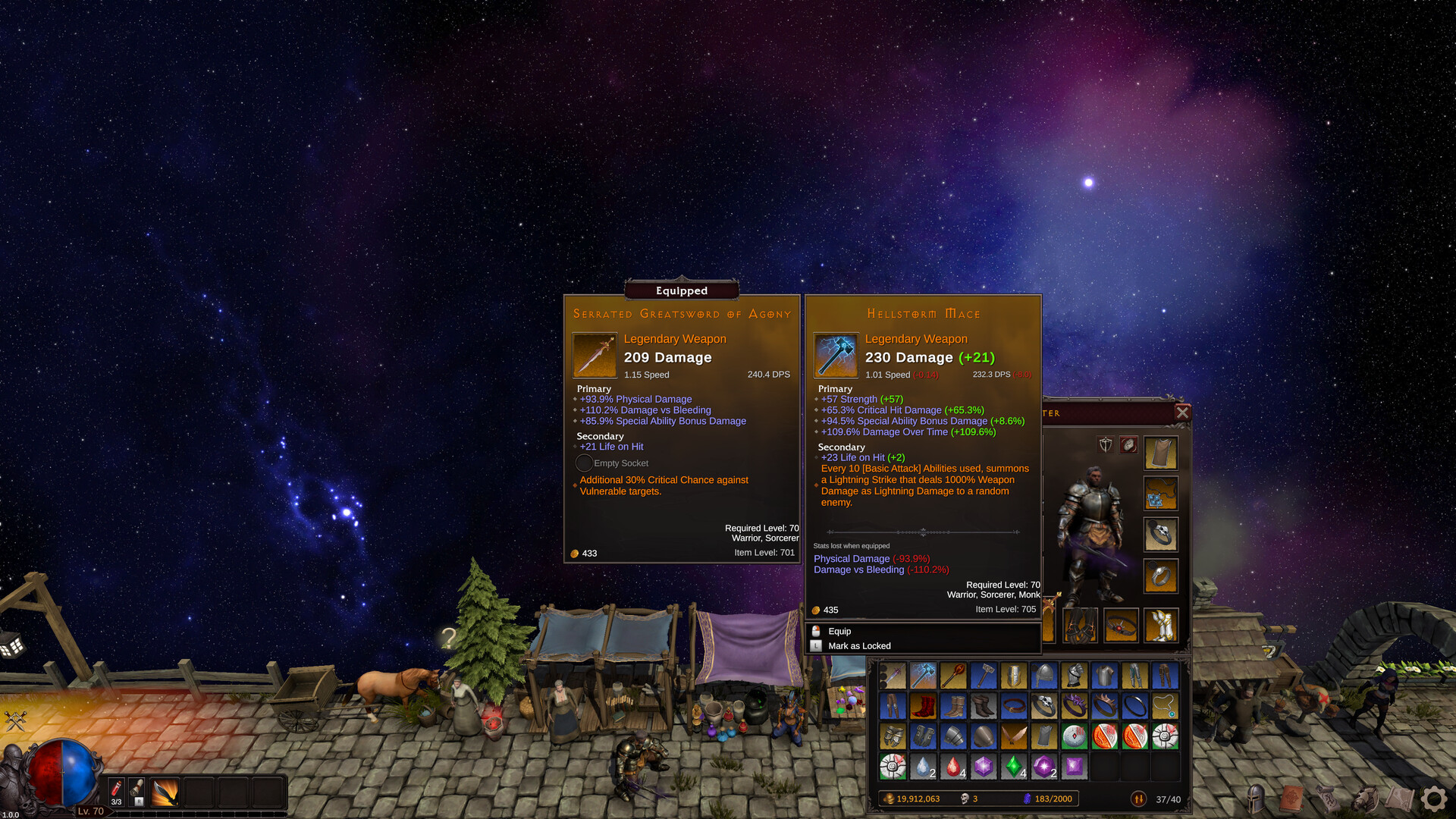
Wikily lists L while targeting an item in inventory, equipment or storage. Read the Mark as Locked tooltip and confirm the locked marker appears.
Separate reserves from sale stock
Move equipment intended for later use to storage. Do not rely on the physical order of icons to protect it from a rarity-based operation.
Review the shop’s toggles
The referenced bulk Sell uses Equipment and Consumables plus Common, Uncommon and Rare toggles. A retained item in those categories should be locked before pressing it.
Read any individual confirmation
The reference says manual selling, salvaging and destroying a locked object asks first. Choosing yes bypasses that checkpoint; it is not a permanent prohibition on disposing of the object.
Evidence: Inventory, Storage and Carriage
The same reference describes a confirmation for selling an unlocked tradable item and rare-item confirmation before destroying Legendary, Divine or Rune Set items. Other unlocked items can be destroyed immediately when dragged out. This makes careful dragging especially important for ordinary-looking consumables or a whole stack. A lock adds a visible decision point, while separate storage organization reduces the chance of targeting the wrong object in the first place.
Evidence: Inventory, Storage and Carriage
Lock protection is action-specific. The shop’s bulk Sell skips locked items, and manual destructive actions ask for confirmation. The reviewed text does not establish every interaction with every automated carriage rule. Keep first unlocks and valuable trade items outside any untested disposal policy.
Evidence: Inventory, Storage and Carriage
Recover a sale before it falls out of the list
Stop selling
The list retains only eight latest sales. Each subsequent sale can push an older entry out, so pause bulk cleanup immediately.
Open a shop and inspect Buyback
Wikily describes one Buyback list shared by shops. Look for the item by its identity and stack, not merely its rarity color.
Make room in inventory
A full bag blocks recovery in the reference. Move a harmless retained object to storage rather than making extra sale transactions just to create room.
Check the required gold
The buyback price is the gold originally received. An empty purse produces Not enough gold; spending sale proceeds can make immediate recovery impossible.
Right-click the intended entry
The reference gives right-click as the buyback action. Confirm the recovered object is back in the bag before resuming inventory work.
Protect it again
Lock the recovered item and move it away from sale stock. If the original decision was wrong, correct the rarity or bulk-sale policy that caused it.
Evidence: Inventory, Storage and Carriage · Deskrawl: Idle ARPG - [Patch 0.1.9] - Resizable/Draggable Window, Cloud Save, Buybacks and More - Steam News
An eight-sale list is a short transaction buffer, not an archive of everything the character ever sold. If nine distinct sales occur after the wanted item, the earliest entry is already outside the documented retention window. The exact counting of complex bulk transactions should be inspected in the client rather than assumed. The practical rule is to recover immediately and avoid creating new sales while diagnosing the mistake.
Evidence: Inventory, Storage and Carriage
Distinguish single purchases, stack sales and Bulk Buy
Wikily says a right-click sale sells the whole stack at its per-item value. Its separate Bulk Buy control uses Shift plus right mouse button to buy ten of a material or stacking item, limited by affordable gold and room. Mystery items are one at a time. These are buying controls, not shortcuts for locking or restoring an entire set of lost gear. Check the tooltip context before using a familiar mouse gesture in a different shop panel.
Evidence: Inventory, Storage and Carriage
| Message or symptom | Condition to inspect | Useful response |
|---|---|---|
| Not enough gold during Buyback | Original sale price exceeds held gold | Recover gold without adding more sale entries if possible |
| Inventory Full! during Buyback | No free inventory slot | Store a retained item and retry |
| Carry Limit Reached! when buying a material | Material carry cap | Inspect the material panel limit |
| Nothing to sell | No unlocked inventory item matches bulk toggles | Review categories, rarities and lock states |
| Wanted item absent from Buyback | It was destroyed/salvaged or aged out | Reconstruct the transaction; do not promise an undo |
Evidence: Inventory, Storage and Carriage
Build a repeatable town cleanup routine
Start each return with comparison, then protection, then disposition. Compare the weapon and visibly weak slots while the new drops are available; lock selected upgrades; store reserve items; inspect chest rewards; finally sell or salvage the remainder. This order prevents a bulk action from deciding what your build needed before you have looked at it. It also keeps future-build equipment from occupying the farming bag indefinitely. The ordering is editorial advice derived from the documented controls, not a claim that the game enforces these phases.
When changing the automation policy, observe a short run before leaving it overnight. A lock in storage and a filter on newly collected equipment operate at different points in the loot path. If your problem is that possible replacements never reach the bag, correcting the rarity action is more useful than locking the current equipped item. The Loot Filter and Auto-Sell guide explains that decision; this page covers manual retention and sale recovery.
Evidence: Inventory, Storage and Carriage
Item protection and recovery questions
Q: Can I sell a locked item deliberately?
Wikily says an individual sale of a locked item asks for confirmation. The bulk Sell action skips it. Do not interpret the lock as preventing a confirmed manual sale.
Q: Can I recover a destroyed stack from Buyback?
The documented list contains NPC sales. Drag-out destruction is a different action and has no documented Buyback recovery.
Q: Does Buyback charge more than I received?
The reference says the purchase price is the gold the item sold for. You still need enough gold and a free inventory slot.
Q: Why did Sell leave Legendary gear in the bag?
The referenced bulk toggles cover Common, Uncommon and Rare Equipment/Consumables. Legendary and higher items and other item types are excluded by that button.
Q: Does an item lock stay meaningful in storage?
Wikily describes the same L control for storage, and its storage page says locked items stay behind in both bulk transfer directions.
Q: Should I keep selling while searching for a missing item?
No. Additional sales can evict it from the eight-entry buffer. Check the list before doing anything that adds transactions.
Evidence: Inventory, Storage and Carriage · Inventory, Storage and Carriage · Deskrawl: Idle ARPG - [Patch 0.1.9] - Resizable/Draggable Window, Cloud Save, Buybacks and More - Steam News
For bulk transfers that preserve locks, continue with Storage Pages and Stash All.
Official interface reference
Sources and scope
Expanded editorial source review for Steam retail app 4623570, Deskrawl: Idle ARPG. Launch-era ApolloTrail advice, dated AFK Meta data, unofficial Wikily references and named official patch notes are separated in the article. New statements are traced in the claim ledger; derived planning examples are identified. Mechanics, source independence and online-server rules have not been verified in the current client.
- Review status
- verified
- Game version
- Source-specific scopes are stated in the body; no installed-client version is asserted.
- Checked
- Method
- Bounded first-release dossier review, including source roles, preserved conflicts and explicit limits. Recomputed retained source hashes, exact excerpts and line ranges and signed reader content. No installed-client or live-server verification.
- Inventory, Storage and Carriage secondary
L locking, whole-stack sale/destruction, manual confirmations, bulk Sell categories, Buyback controls and messages. Source text was reviewed from the retained acquisition snapshot; this is not a current-client test.
Checked
- Deskrawl: Idle ARPG - [Patch 0.1.9] - Resizable/Draggable Window, Cloud Save, Buybacks and More - Steam News first-party
Official introduction of Buyback for the last eight NPC sales in patch 0.1.9. Source text was reviewed from the retained acquisition snapshot; this is not a current-client test.
Checked
- Salvage secondary
Salvage is material conversion; Buyback is documented for NPC sales. Source text was reviewed from the retained acquisition snapshot; this is not a current-client test.
Checked
- Inventory, Storage and Carriage secondary
Bulk-transfer lock exclusions. Source text was reviewed from the retained acquisition snapshot; this is not a current-client test.
Checked
- Inventory, Storage and Carriage secondary
Automated pickup/disposal occurs at a separate stage from manual item protection. Source text was reviewed from the retained acquisition snapshot; this is not a current-client test.
Checked
- Official Steam retail promotional screenshots first-party
The attributed promotional figure only; capture date and client build are not established, and it is not a current gameplay test.
Checked