- For strip width, use the game-width control in Settings; for position, use the cross-shaped drag widget. Resolution, panel layout and window placement are separate adjustments.
- Official 0.1.9 changed the Boss Key to Alt+B and kept the taskbar icon visible. Wikily reports hide-and-mute with the same shortcut pressed again to restore; the key is different from consumable boss-access keys.
Choose the control for the problem
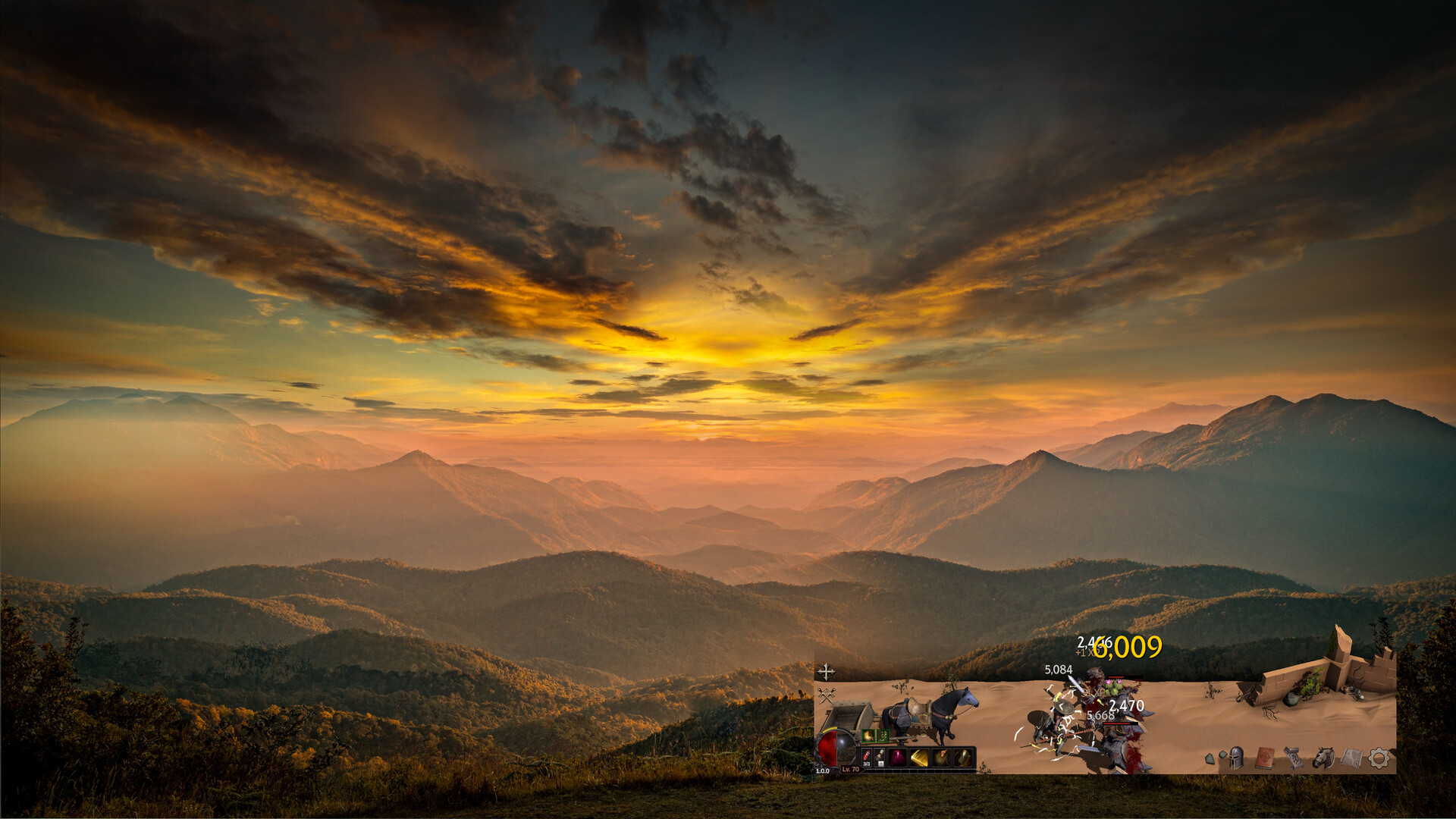
Deskrawl’s official store presents a game running at the bottom of the desktop. To make that strip fit your work area, begin with the setting that changes its physical width. Official 0.1.9 introduced the game-width slider and a cross-shaped drag widget; 0.1.9a then added Resolution, cross-monitor dragging and clicking the widget to reset position. A panel that appears outside the strip is a third issue, handled by UI-layout controls.
Evidence: Save 30% on Deskrawl: Idle ARPG on Steam · [Patch 0.1.9] - Resizable/Draggable Window, Cloud Save, Buybacks and More · [Patch 0.1.9a] Variety of QOL and Bug Fixes
| Problem | Control to inspect | Scope |
|---|---|---|
| Strip occupies too much desktop width | Game width / Window Width | Window width, not a new farming node |
| Strip is on the wrong part of the screen | Cross-shaped drag widget | Window position |
| Strip needs another render resolution | Resolution in Settings | Rendering resolution; source says fullscreen-dependent |
| Inventory or talent panel is misplaced | Reset UI only / Reset UI Layout | Panel arrangement |
| Game should fill the display | Fullscreen | Different presentation mode, with different available controls |
| Need to hide quickly | Boss Key binding | Hide/mute; persistent taskbar icon in 0.1.9 |
Evidence: [Patch 0.1.9] - Resizable/Draggable Window, Cloud Save, Buybacks and More · [Patch 0.1.9a] Variety of QOL and Bug Fixes · [0.1.13] New Talents, Online Mode, Leaderboard and Anti-cheat! · Controls and Settings
Look for the cross shape rather than relying on an exact corner. The official 0.1.9 description places it on the right; ApolloTrail’s screenshot caption describes a top-left widget. The shape and drag behavior agree, but the position differs between these source descriptions. That is why a cropped screenshot or an older layout is a poor reason to conclude the widget has disappeared.
Evidence: [Patch 0.1.9] - Resizable/Draggable Window, Cloud Save, Buybacks and More · Deskrawl Beginner Guide: First Hours, Loot Filter, Auto-Sell and Window Setup
Resize and move in a controlled order
Record the starting layout
Open Settings and note width, resolution, fullscreen and always-on-top choices. Keep a screenshot of the current strip and panels.
Reduce width first
Move the width slider a little, close Settings and check that buttons and the intended game view remain reachable. Do not change resolution at the same time if the only problem is desktop space.
Move with the cross widget
Drag the cross-shaped control to the intended desktop area. Cross-monitor support is an announced 0.1.9a feature; confirm the result on your own display arrangement.
Check other windows
Select a normal application outside the game view and then reopen a game panel. Verify both directions of interaction instead of judging only the visual placement.
Test restoration
If the strip’s position is wrong, the 0.1.9a note describes clicking the widget to reset it. If a panel remains misplaced, use the narrower UI-layout reset.
Evidence: [Patch 0.1.9] - Resizable/Draggable Window, Cloud Save, Buybacks and More · [Patch 0.1.9a] Variety of QOL and Bug Fixes · Deskrawl Beginner Guide: First Hours, Loot Filter, Auto-Sell and Window Setup
Wikily’s Settings reference reports Window Width from 0.5 to 1, with Resolution, Window Width and Always on Top available only while Fullscreen is off. It separately lists fullscreen wallpaper choices when Fullscreen is on. These are source-reported menu rules, not a tested screenshot of your build. If a width control is unavailable, inspect fullscreen state before assuming a missing feature.
Evidence: Controls and Settings
Bind and test the Boss Key
The Boss Key is the hide shortcut. Official 0.1.9 establishes Alt+B and a remaining taskbar icon; Wikily describes hiding the window and muting game audio, then restoring it when pressed again, including while unfocused. Hiding does not close the process or collect Expedition rewards. This shortcut has no relation to the item keys used to access bosses or challenges.
Evidence: [Patch 0.1.9] - Resizable/Draggable Window, Cloud Save, Buybacks and More · Controls and Settings
Read the displayed binding
In Settings, inspect the current Boss Key rather than assuming the default has survived a previous change.
Rebind only that shortcut
ApolloTrail describes clicking its Settings entry and pressing the new key. Wikily says the Boss Key is rebindable while other panel shortcuts are fixed; choose a combination that does not collide with your other application.
Hide once, then restore
Test while the game is visible, then again with another window focused if you need that behavior. Confirm that both hiding and return work before relying on it.
Check audio separately
Listen for the reported mute-and-restore behavior. Background-audio settings and the Boss Key are different controls; a silent game is not proof that it closed.
Evidence: Deskrawl Beginner Guide: First Hours, Loot Filter, Auto-Sell and Window Setup · Controls and Settings
Do not treat the hide shortcut as a privacy guarantee or a tray-only command. The official announcement explicitly preserves the taskbar icon. If the binding fails, return to Settings and inspect it; repeatedly pressing the old default does not prove the game froze. If normal clicks also fail on Linux, use the Proton input diagnostic before resetting unrelated window preferences.
Evidence: [Patch 0.1.9] - Resizable/Draggable Window, Cloud Save, Buybacks and More
Recover after a display or layout change
| What is misplaced | Try first | Broader option |
|---|---|---|
| The whole strip | Position reset via cross widget | Inspect monitor arrangement and fullscreen state |
| Only panels | Reset UI only / Reset UI Layout | Record and inspect the affected panel again |
| Many settings were changed | Record the values you need to keep | Reset All to Default / Reset to Default |
| Ultrawide view crops UI | Update to include the announced 0.1.13f fix | Then reproduce and record the affected panel |
| Clicks outside the strip are swallowed | Check app/build and input behavior | 0.1.9 announced an outside-view click-through fix |
Evidence: [Patch 0.1.9a] Variety of QOL and Bug Fixes · [0.1.13] New Talents, Online Mode, Leaderboard and Anti-cheat! · [0.1.13f] Bug Fixes · [Patch 0.1.9] - Resizable/Draggable Window, Cloud Save, Buybacks and More · Controls and Settings
Use the narrow reset first. A panel-layout reset is less likely to erase preferences you are trying to preserve than a global default reset. The sources use both older and newer labels for these buttons, so compare scope as well as wording. Reopen the same panel after the reset and check whether the actual problem is solved before changing another setting.
Evidence: [0.1.13] New Talents, Online Mode, Leaderboard and Anti-cheat! · Controls and Settings
The 0.1.13f announcement also fixes clicks interrupting or blacking out a video player. That provides a dated version clue if you are following early demo reports about multitasking. It does not certify every browser, display scaling or compositor. Keep version, display arrangement and the smallest repeatable action when reporting a remaining problem.
Evidence: [0.1.13f] Bug Fixes
Window questions
Q: Why is the width slider unavailable?
Wikily reports width, resolution and always-on-top controls only with Fullscreen off. Check that state and your current menu text.
Q: Does Alt+B remove the taskbar icon?
Official 0.1.9 says the icon remains visible. The hide shortcut is not described as tray-only behavior.
Q: Should I use Reset All when one panel is lost?
Inspect the UI-layout reset first. Official 0.1.13 introduced Reset UI only; a broader reset changes a broader set of preferences.
Q: Is the Boss Key a boss-entry item?
No. Here it means the hide shortcut. A key item consumed for a boss or challenge belongs to a different system.
Q: Does a hidden strip keep earning Expedition rewards?
Hiding and closing are different states. A running game uses the live loop; the closed-game expedition article describes the separate reward conditions.
Evidence: Controls and Settings · [Patch 0.1.9] - Resizable/Draggable Window, Cloud Save, Buybacks and More · [0.1.13] New Talents, Online Mode, Leaderboard and Anti-cheat! · Controls and Settings
Official interface reference
Sources and scope
Source-reviewed guide for Deskrawl: Idle ARPG retail app 4623570. Historical demo/beta announcements are labeled by version; secondary mechanics and individual player reports retain attribution. Source review expanded the article; no game session, Steam Deck or Linux hardware test was performed. Current implementation and identified gaps still require gameplay confirmation.
- Review status
- verified
- Game version
- Retail identity: Steam app 4623570. Official news captured through 1.0.0i; any earlier 0.1.x announcement is historical, not a current installed-version observation.
- Checked
- Method
- Bounded first-release dossier review, including source roles, preserved conflicts and explicit limits. Recomputed retained source hashes, exact excerpts and line ranges and signed reader content. No installed-client or live-server verification.
- Save 30% on Deskrawl: Idle ARPG on Steam first-party
Official retail app 4623570 description of desktop idle combat, minion carriage, town progression and Steam Market. Marketing description is not a reward-rate or platform test.
Checked
- [Patch 0.1.9] - Resizable/Draggable Window, Cloud Save, Buybacks and More first-party
Official June 16 announcement of width/drag, Cloud Save, auto revive, eight-item NPC buybacks, Alt+B and persistent taskbar icon; historical intended behavior.
Checked
- [Patch 0.1.9a] Variety of QOL and Bug Fixes first-party
Official June 17 announcement of Resolution, Reset All, cross-monitor dragging and click-to-reset position; historical intended behavior.
Checked
- [0.1.13] New Talents, Online Mode, Leaderboard and Anti-cheat! first-party
Official June 27 introduction of online creation, legacy offline conversion, multiple save slots, Combat Settings, item Lock and Reset UI only. Its Treant leaderboard rules belong to that test build.
Checked
- [0.1.13f] Bug Fixes first-party
Official July 17 fixes for video-player interruption, ultrawide cropping and corrupted saves, plus backup relocation. No exact save path or backup cadence is announced.
Checked
- Deskrawl Beginner Guide: First Hours, Loot Filter, Auto-Sell and Window Setup secondary
Source text reviewed for first-session node repetition, Life Skills prices, potion and carriage settings, and window controls. The guide scopes itself through 1.0.0h; player reports remain reports, not reproduced gameplay.
Checked
- Controls and Settings secondary
Wikily report of panel shortcuts, item locking, text-field/cutscene exclusion and Boss Key hide/mute/rebind behavior. Not reproduced in the client.
Checked
- Controls and Settings secondary
Wikily report of volume, language, fullscreen-dependent controls, brightness, Menu/HUD Scale and panel/reset buttons. Names differ from older announcement labels; no current UI test.
Checked
- Official Steam retail promotional screenshots first-party
The attributed promotional figure only; capture date and client build are not established, and it is not a current gameplay test.
Checked